> ## Documentation Index
> Fetch the complete documentation index at: https://docs.gameboost.com/llms.txt
> Use this file to discover all available pages before exploring further.
# Store credit and GB Coins
> How GameBoost store credit and GB Coins work.
### **Using Store Credit and Coins**
* **What they are**: Store credit and GB Coins are **non-expiring** currencies on GameBoost that you can use to receive discounts on future purchases.
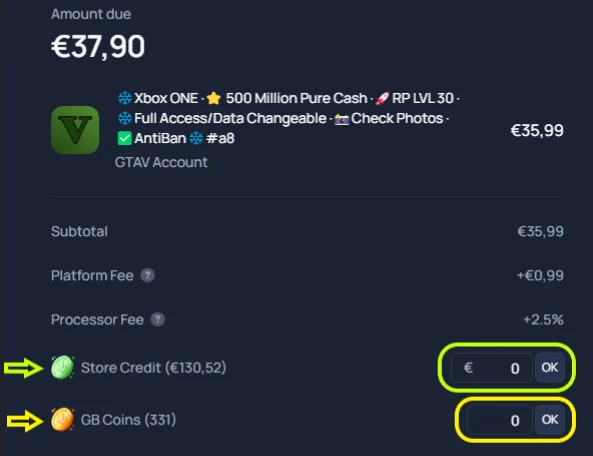
* **How to use them** - At checkout, you'll see two options for applying these currencies:
* **Store Credit** - Represented by a green coin icon
* **GB Coins** - Represented by a golden coin icon
* **Applying credits** - Enter the amount of store credit and/or GB Coins you want to use in the designated fields during checkout to apply your discount.
 ### How refunds to store credit work
* When an order is refunded to your store credit, you receive the **full amount you paid** - including any fees from the original purchase.
* When you use that store credit on a new order, standard **processing fees apply again** (just like any other purchase), since they're charged per transaction by our payment processor.
> 💡 **Example:** You pay €100 for an order. If it's refunded to store credit, you'll receive the full €100 back to your wallet. When you place a new order using that credit, the usual processing fees will apply to the new transaction.
### Missing store credit?
If you're missing store credit or GB Coins, they may be **locked in a pending (unpaid) order**.
**To recover them yourself:**
* Go to [**My Orders**](https://gameboost.com/orders)
* Find any pending or unpaid orders
* **Delete** the pending order - your store credit and coins will be returned to your wallet automatically
> If you're still missing credit after that, [**open a support ticket**](https://gameboost.com/help/tickets/create) with your client ID and we'll investigate.
### How refunds to store credit work
* When an order is refunded to your store credit, you receive the **full amount you paid** - including any fees from the original purchase.
* When you use that store credit on a new order, standard **processing fees apply again** (just like any other purchase), since they're charged per transaction by our payment processor.
> 💡 **Example:** You pay €100 for an order. If it's refunded to store credit, you'll receive the full €100 back to your wallet. When you place a new order using that credit, the usual processing fees will apply to the new transaction.
### Missing store credit?
If you're missing store credit or GB Coins, they may be **locked in a pending (unpaid) order**.
**To recover them yourself:**
* Go to [**My Orders**](https://gameboost.com/orders)
* Find any pending or unpaid orders
* **Delete** the pending order - your store credit and coins will be returned to your wallet automatically
> If you're still missing credit after that, [**open a support ticket**](https://gameboost.com/help/tickets/create) with your client ID and we'll investigate.