> ## Documentation Index
> Fetch the complete documentation index at: https://docs.gameboost.com/llms.txt
> Use this file to discover all available pages before exploring further.
# Contacting a Partnered Seller
> How to message sellers before or after purchase, and what to do if they don't respond.
On GameBoost, there are two ways to communicate with partnered sellers about questions before purchase, delivery, or assistance after your order.
***
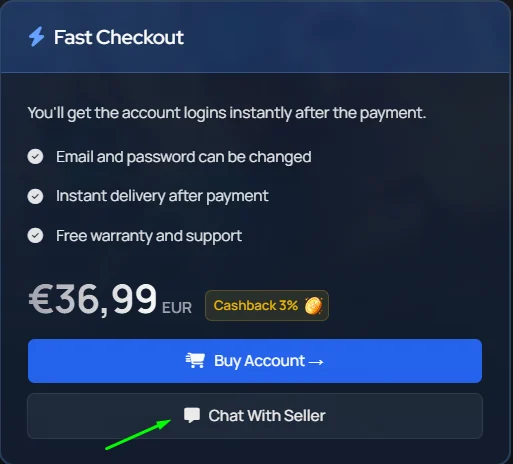
* On select product pages, you can **message the seller directly** with questions about that specific listing.
* Not all sellers have direct messaging enabled.
 * Every order includes a direct **order chat** you can use to discuss order details, delivery, or any issues.
* To find your order chat, go to [your orders](https://gameboost.com/orders), click the order in question, and you'll land on the page with your chat box.
## **Seller availability**
Sellers can set their store to **offline mode** when they're stepping away: for a break, holiday, or any reason they can't fulfill orders normally.
When a seller has offline mode enabled, you'll see a clear notice on their profile, listings, checkout, and order pages.
> 🔴 **Seller is currently offline**\
> *This seller is taking a break and is not accepting new orders for this offer right now.*
***
## **What does offline mode mean for the buyer?**
Depending on how the seller has set it up, a few things may change:
* Some listings may be **hidden or unavailable** for purchase until the seller returns.
* **Instant delivery offers** may still be available, while manual-delivery offers are paused.
* ## For some orders, **delivery may be reserved** and the countdown paused until the seller is back online, so you won't be penalized by the wait.
> If your seller is **unresponsive in the order chat for a prolonged period**, you can [**open a support ticket**](https://gameboost.com/help/tickets/create) and we'll step in to help resolve it quickly
> Keep all transactions and communication on GameBoost to stay fully protected. We can't provide support if communication happens off-platform (Discord, WhatsApp, Telegram, etc.) for private deals or other arrangements.
***
* Every order includes a direct **order chat** you can use to discuss order details, delivery, or any issues.
* To find your order chat, go to [your orders](https://gameboost.com/orders), click the order in question, and you'll land on the page with your chat box.
## **Seller availability**
Sellers can set their store to **offline mode** when they're stepping away: for a break, holiday, or any reason they can't fulfill orders normally.
When a seller has offline mode enabled, you'll see a clear notice on their profile, listings, checkout, and order pages.
> 🔴 **Seller is currently offline**\
> *This seller is taking a break and is not accepting new orders for this offer right now.*
***
## **What does offline mode mean for the buyer?**
Depending on how the seller has set it up, a few things may change:
* Some listings may be **hidden or unavailable** for purchase until the seller returns.
* **Instant delivery offers** may still be available, while manual-delivery offers are paused.
* ## For some orders, **delivery may be reserved** and the countdown paused until the seller is back online, so you won't be penalized by the wait.
> If your seller is **unresponsive in the order chat for a prolonged period**, you can [**open a support ticket**](https://gameboost.com/help/tickets/create) and we'll step in to help resolve it quickly
> Keep all transactions and communication on GameBoost to stay fully protected. We can't provide support if communication happens off-platform (Discord, WhatsApp, Telegram, etc.) for private deals or other arrangements.
***